Years 7 to 11 · ages 11 to 16 · Python Lab · Puzzle Maths · AI Explorers · GCSE
Real Python, real puzzles, then GCSEs that mark themselves.
Python that runs in the browser, puzzle maths and straight talk about the digital world in Years 7 to 9. Then STEM GCSEs: exam-style questions marked against the mark points, timed mocks, a weekly plan and a built-in voice tutor.
Free account, no card needed. No adverts, and plans never auto-renew.

- What is it?
- How it learns
- Data and bias
- Asking well and checking
- Deepfakes and staying safe
- In the world around us
- Number puzzles
- Algebra puzzles
- Geometry puzzles
- Logic puzzles
- Counting and probability
- Sequences and patterns
- Rates and ratio
- Output and variables
- Input and maths
- Selection
- Loops
- Lists
- Functions
- Strings
- Simple games and turtle art
- Organisation and the Digestive System
- Preventing and Treating Disease
- Organising Animals and Plants
- Photosynthesis
- Plant Diseases (Separate Biology only)
- Human Nervous System
- Ecosystems
- Ecosystems and Biodiversity
- Hormonal Coordination
- Homeostasis in Action (Biology only)
- Reproduction
- Genetics and Evolution
- Cell Biology
- Respiration
- Structure and Bonding
- Quantitative Chemistry: Part One
- Quantitative Chemistry: Part Two (Triple only)
- Chemical Changes: Metals
- Chemical Changes: Electrolysis
Years 7–11 · what's inside
Inside PrepAcer Secondary
Two courses, bought one at a time: KS3 for Years 7 to 9, and GCSE for Years 9 to 11. Each GCSE subject includes Foundation and Higher content, so nobody picks a tier.
PrepAcer KS3
Maths and computing for Years 7 to 9
Years 7–9 · 819 questions
AI Explorers
What machine learning is, what it gets wrong and staying safe
Years 7–9 · 6 topics · 240 questions
- What is it?
- How it learns
- Data and bias
- Asking well and checking
- Deepfakes and staying safe
- In the world around us
Puzzle Maths
Puzzles in the style of the UKMT Junior Challenge
Years 7–9 · 7 topics · 315 questions
- Number puzzles
- Algebra puzzles
- Geometry puzzles
- Logic puzzles
- Counting and probability
- Sequences and patterns
- +1 more
Python Lab
Python that runs in the browser, with a project in every unit
Years 7–9 · 8 topics · 264 questions
- Output and variables
- Input and maths
- Selection
- Loops
- Lists
- Functions
- +2 more
PrepAcer GCSE
GCSE maths, science and computing revision
Years 9–11 · 8,455 questions
- MathematicsAQA 8300
Foundation and Higher content
43 topics · 2,580 questions
Multiple choiceWritten working - StatisticsAQA 8382
Foundation and Higher content
17 topics · 1,740 questions
Multiple choiceWritten working - Level 2 Certificate in Further MathematicsAQA 8365
Level 2 Certificate, not a tiered GCSE
19 topics · 1,080 questions
Multiple choiceWritten working - ChemistryAQA 8462
Separate GCSE, not Combined Science. Foundation and Higher content
16 topics · 960 questions
Multiple choiceWritten working - BiologyAQA 8461
Separate GCSE, not Combined Science. Foundation and Higher content
14 topics · 840 questions
Multiple choiceWritten working - PhysicsAQA 8463
Separate GCSE, not Combined Science. Foundation and Higher content
12 topics · 715 questions
Multiple choiceWritten working - Computer ScienceOCR J277
No tiers
9 topics · 540 questions
Multiple choiceWritten working
Topics follow the exam board specification, so you can match each subject to your school's. Counts grow as questions are added.
A year at a glance
What each year sees
Topics match the school year and move up when the year does. Nothing is too easy or too hard.
Year 7
- Python Lab
- Puzzle Maths
- AI Explorers
Year 8
- Python Lab
- Puzzle Maths
- AI Explorers
Year 9
- Python Lab
- Puzzle Maths
- AI Explorers
- GCSE begins
Year 10
- GCSE maths
- Sciences
- Computer science
- Statistics
Year 11
- GCSE maths
- Sciences
- Computer science
- Statistics
- Timed mocks
9,274
original practice questions
10
subjects and routes, each by topic
5
year groups, each with its own topics
Try it
A few sample questions
Answer, check, and read the explanation. Nothing is saved.
Python Lab · Loops · Question 1 · 1 mark
Puzzle Maths · Counting · Question 2 · 1 mark
AI Explorers · Checking answers · Question 3 · 2 marks
Statistics · Sampling · Question 4 · 1 mark
Statistics · Averages · Question 5 · 1 mark
Statistics · Scatter graphs · Question 6 · 1 mark
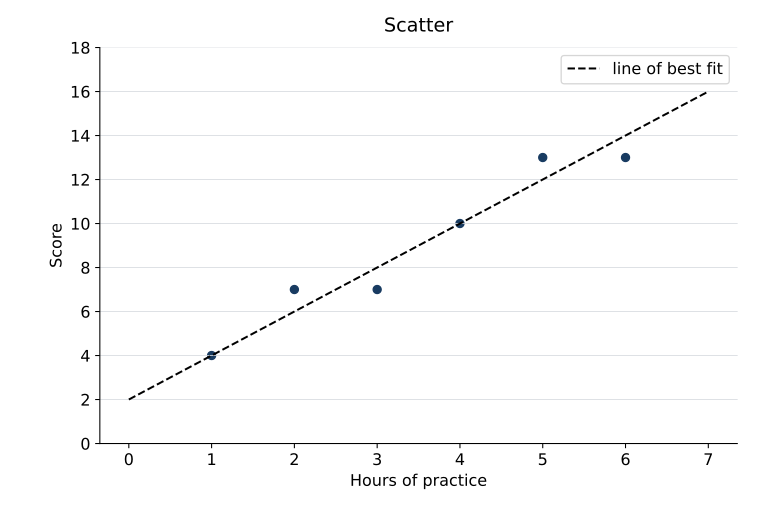
Probability · Question 7 · 1 mark
Statistics · Sampling · Question 8 · 2 marks
0 of 8 answered.
Instant Marking
Watch an answer get marked
Multiple-choice and number answers are marked instantly. Written answers are checked point by point against the mark scheme, so you see exactly which marks you earned and which you missed. Python programs are checked against tests, right in the browser.
Automatic marking can occasionally get it wrong, so every answer has a “Question this mark” button, and you can mark yourself if credits run out.
Statistics · Sampling
Marked
Describe how to take a systematic sample of 30 people from 300. [2 marks]
- Met: Random starting point
- Missed: Says where the 10 comes from (300 ÷ 30)
1 / 2
Good method. Show the interval: 300 ÷ 30 = 10.
Practice that tells you what to do next
Calm, clear steps for children, parents and teachers.
Code that runs where you are
Write Python in the browser, press Run, and see the output, the turtle drawing and which tests pass. Nothing to install.
Understand each mistake
Every answer lists the mark points met or missed, with a tip for the next mark. Think a mark is wrong? One tap flags it.
Know what to do next
Wrong answers collect in a Mistakes to retry list, and a weekly plan spreads topics across the weeks to the exam.
Keep track of progress
Red, amber and green by topic, with timed practice mocks when you are ready. Parents see activity and scores.
Optional extras
Helpful tools for revising alone or with friends.
- GCSE
Built-in voice tutor
On GCSE Plus plans: type or speak a question. The tutor explains, then asks a follow-up, and only talks about syllabus topics.
- Friends
Group Challenge
Quiz friends in a private squad: same timed questions, quickest correct answers score most. Chat opens only during a challenge and is then deleted.
Calculator and formulae
An on-screen calculator and a formulae sheet, for the papers that allow them.
The whole child, in every stage
Exam-ready
11+, GCSE and A level: exam-style questions, timed mocks and marks that show their reasoning.
Thinks clearly
Puzzle Maths from Year 5 to Year 9: problems with a clever way in, in the style of the national challenges.
Builds things
Code Quest's block coding in primary, then Python Lab in Years 7 to 9: real programs, run in the browser, with a project in every unit.
Understands the digital world
AI Explorers: how chatbots work, why they get things wrong, bias, deepfakes and who is responsible. Straight answers for Years 7 to 9.

For parents
Independent work you can see
Short sessions fit around school. KS3 units end in a project; GCSE topics end in a mark you can trust. Progress and scores are there when you want them.
- Years 7 to 11, each year with its own topics
- No adverts, no tracking, nothing sold
- Group Challenge is friends only, with a parent's OK
How it works
- 1
Create an account
Sign up with your email, then choose a username for your child. One account per child.
- 2
Pick the year and the course
Year 7, 8 or 9 for KS3; Year 9, 10 or 11 for GCSE, with the subjects being taken and the exam date.
- 3
Start a first session
Programs run in the browser with instant test results. Exam questions are marked straight away with feedback.
PrepAcer KS3: paid once, by a parent
Years 7–9. One payment for a fixed term, with a free sample first. It never renews by itself, so there is nothing to cancel.
Free
Try it with no card.
Free
No card needed
- 10% of every topic's questions (up to 10 each)
- Explanations after every answer
- Weekly plan and progress you can see
- 10 credits each month for instantly marked written answers, and self-marking if they run out
Plus
Every question, with a clear explanation each time.
£44.99
for 6 months, paid once. About £7.50 a month.
- Every question in every subject: puzzle maths, Python and AI literacy
- Python that runs in the browser, with a project at the end of every unit
- Instant marking of written answers, with 400 credits each month and self-marking if they run out
- Group Challenge with friends (up to 20 questions, no chat)
- Weekly plan and progress you can see
Each plan is for one child's account in this module. A parent creates the account and pays.
PrepAcer GCSE: paid once, by a parent
Years 9–11. One payment for a fixed term, with a free sample first. It never renews by itself, so there is nothing to cancel.
Free
Try it with no card.
Free
No card needed
- 10% of every topic's questions (up to 10 each)
- Study plan and topic checklists
- A sample Group Challenge (5 questions)
- 10 credits each month, and self-marking if they run out
Plus
Everything you need to revise, with 400 credits a month for instant marking and the voice tutor.
£59.99
for 6 months, paid once. About £10.00 a month.
- Every exam-style question
- Full timed mock tests
- Instant marking of written answers, with feedback
- Built-in voice tutor
- Group Challenge with friends (up to 20 questions)
- 400 credits each month, and self-marking if they run out
Pro
Our most detailed marking and tutoring, with 1,200 credits a month.
£94.99
for 6 months, paid once. About £15.83 a month.
- Everything in Plus
- Our most detailed marking and voice tutoring
- 1,200 credits each month
Each plan is for one child's account in this module. A parent creates the account and pays.
How credits work
Credits pay for the two things that take extra work: instantly marking written answers and the voice tutor. Multiple-choice and number answers are marked by the app and never use credits.
| Action | Credits |
|---|---|
| Mark a short written answer | 1 |
| Mark an extended written answer | 3 |
| Ask the tutor a question | 2 |
- For example, Plus's 400 credits a month cover 400 short answers, or 133 extended answers, or a mix of both.
- Credits reset every 30 days from the day a paid plan starts. The free plan's 10 credits reset at the start of each month. Unused credits do not carry over.
- If credits run out, nothing is blocked: your child can mark their own written answers against the mark points, and instant marking and the voice tutor come back at the next reset.
Built for children, trusted by parents
Minimal data
A parent email, a username for your child, their subjects and plan length. Children never need an email address.
No ads, no tracking
No analytics cookies and nothing sold. Their work is theirs.
Marking that shows its working
Every marked answer lists the mark points and has a “Question this mark” button.